| Vendors | Contacts | Comments |
| Aquatech | https://aquatechpm.com 704-644-3121(9am to 5pm) 704-577-7537(after hour emergency) Griffin Ballard gballard@aquatechpm.com 704-577-6597 Sebastian Anderson <Sebastian@aquatechpm.com> Regional Director of Operations at AquaTech Pool Management | |
| City for Pool Inspection | ||
| Kurt Biller | Kurt Biller 980-253-9832 | Renovation Carpentry |
| RFP Access Control System OVRC | +1 (704) 626-6617(Mobile) Activations@rfptech.biz https://app.ovrc.com user board@lexclt.com | Once Logged into Ovrc: 1. Customers > Click Lexington > Devices > On the Extreme Right of “Access Server” 2. Click Web Connect as shown in the following picture 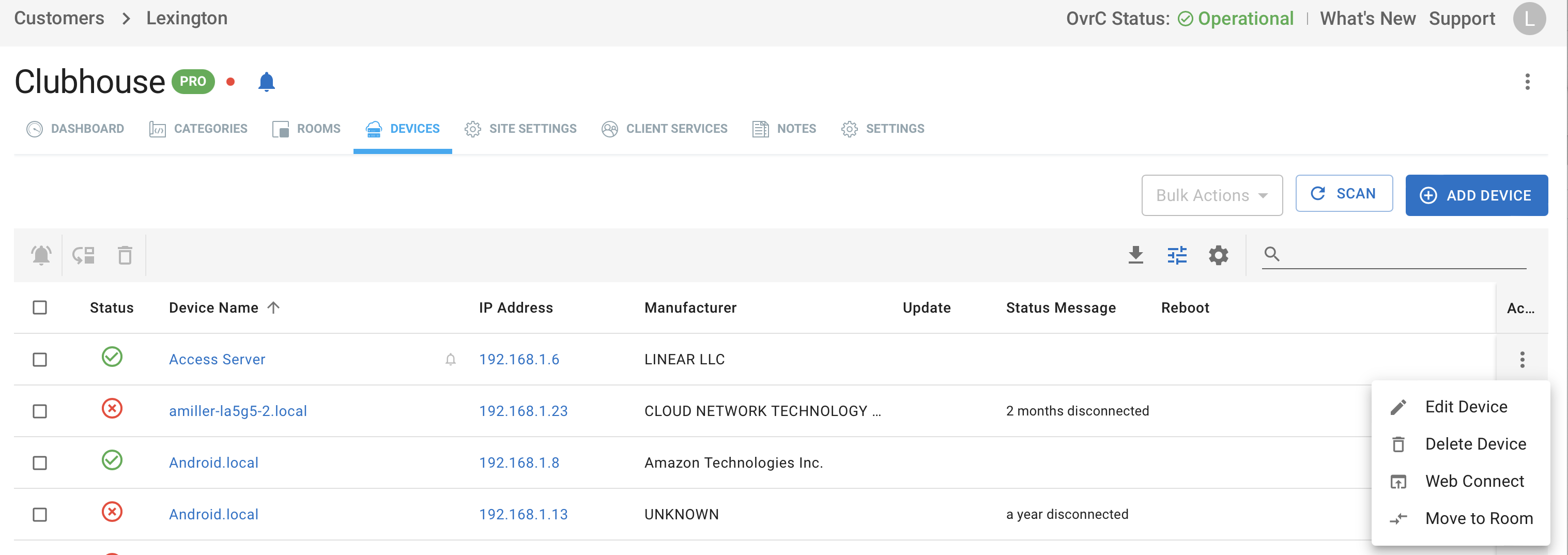 3. Click Connect as shown below  4. Once in Linear eMerge: > login with USER HOA 5. For Report > go to the gray icon on the right that looks like a graph and click it > click access reports > select your date range > Select specific door or all > click search |
| Security System | 8097 To ARM : Put in CODE then press away (2) Enter CODE then press off (1) If alarm set and triggered even fob won’t fix. Turns off noise but you need to enter CODE and press off (1) If alarm set but not triggered the fob will disarm for you. This has been submitted to Security Central. Also, you may want to note, your password with Security Central is 11030. This is how the operator will verify your identity. custserv@security-central.com | |
| RFP Luma Cameras | Dustin@rfptech.biz (704) 626-6874 | Windows > Edge Browser http://lexingtonpool.wirepathdns.com:81 Luma Surveillance App Devices > + to Add Device URL : lexingtonpool.wirepathdns.com port 8000 Lexington 11030Lexington |